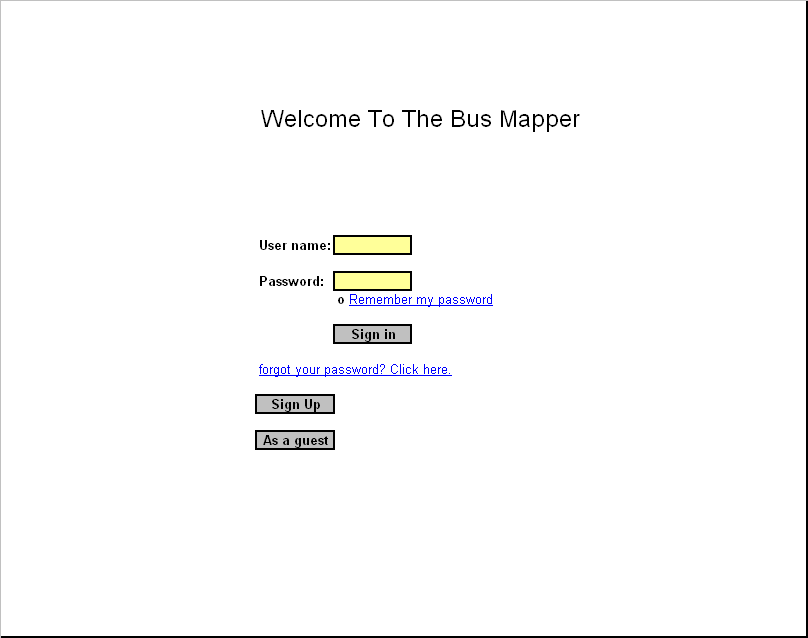
The sign-in page of the website should be the page where users log in if they already are registered, register if they have not done so yet or visit the site as a guest.
On top of the page, not too close to the
edge, It will say ‘Welcome
To The Bus Mapper’ in bold and in font 18. 7 lines down, starting from
the
center of the line, it will say User name following a box to take the
user
name. On the next line, there will say ‘password’ following a box to
take the
users’ family names. Right underneath the password box, there will be
an option
to click on that says ‘Remember my password’ this will make the users’
web
browser save user’s information ( user name and password) to reuse
again
whenever they visit the main page. Right below, there will be a button
that says
‘Sign in’. This action will take the users to the next page with the
user’s
preferences specified before in their registration form. Right below,
there
will be a link that will say “Forgot your password? Click here.” This
link will
take the users to another page asking them about their personal
information to
issue the forgotten password. Next line, there will be another button
that will
say “sign up” on it. This button will take the users to the
registration page
so they can register and create an account. Right underneath this
button, there
will exist another button that will say “as a guest” on it. This button
will
take the users to the main page with default specification. This is for
users
who are not members but want to get fast information from the site.
Low-fidelity prototype: