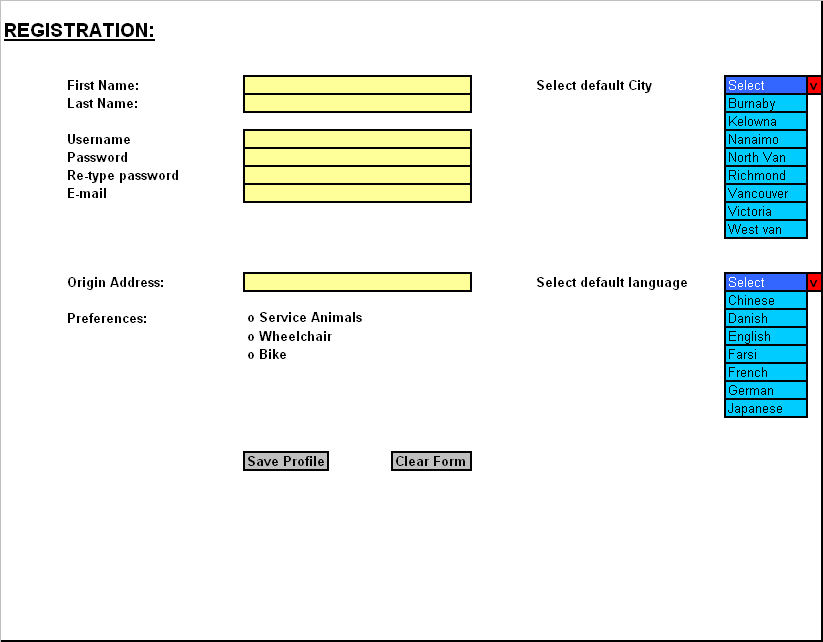
Once the user has chosen to sign-up from the main page he/she will be taken to the Registration page. On the top left-corner of the page, it will say ‘REGISTRATION:’ in underline bold Arial font size 14. Two lines underneath it and one tab ahead, there will say ‘First Name:’ in bold Arial font size 10. There will be a box in front of it. Users will write their first name inside it. Next line, it will say ‘Last Name:’ in bold Arial font size 10. There will be a box in front of it. Users will write their last name inside it. Two lines below, there will say ‘Username’ in bold Arial font size 10. There will be a box in front of it. Users will write their desired username inside it. Below, it will say ‘Password:’ in bold Arial font size 10. there will be a box in front of it. Users will write their desired password inside it. Below, it will say ‘Re-type password:’ in bold Arial font size 10. There will be a box in front of it. Users will re-write their specified password inside it. Below, it will say ‘E-mail:’ in bold Arial font size 10. There will be a box in front of it. Users will write their E-mail inside it. Four lines below, it will say ‘Origin Address:’ in bold Arial font size 10. There will be a box in front of it. Users will write the address of their origin i.e. home, work etc. inside it. Two lines below, it will say ‘Preferences:’ in bold Arial font size 10. There will be three options lined up in three different lines in front of it. In the first line, it will say ‘Service Animals’, second line will say ‘Wheelchair’ third line will say ‘Bike’ all in bold Arial font size 10.
on top right-corner one tab in front of the
first name box,
it will say ‘Select default City’ in bold Arial font size 10. There
will be a
pull-down menu right in front of it. The items on this pull-down menu
are as
follow:
Low-fidelity prototype: