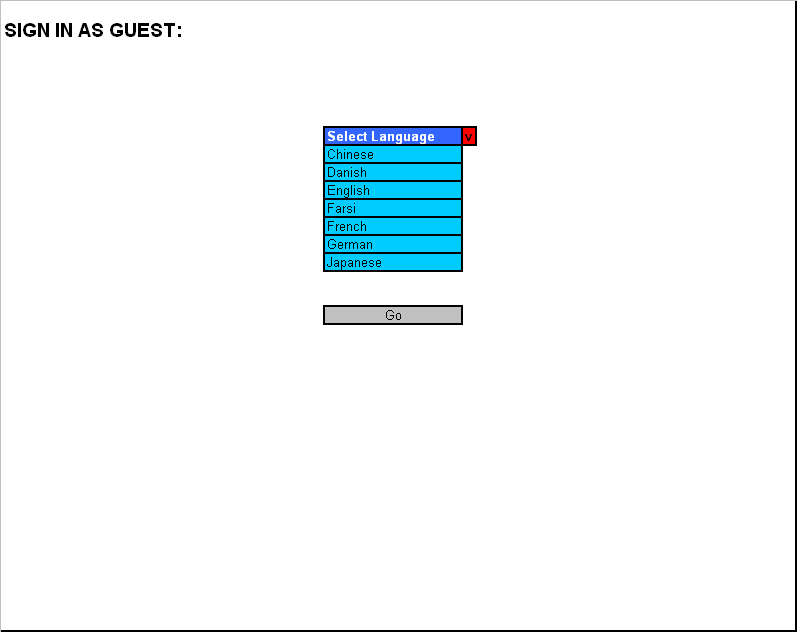
Once the user clicks on the sign up “As a
guest” button
he/she will be taken to another page. This page consists of a menu in
the
center of the page. The menu states “Select Language” and when the user
clicks
on the menu with the mouse or just moves the mouse cursor on the menu,
a set of
sub-menus will appear to the user. The sub-menus provide the user with
different languages to choose from. For now the languages available
are:
Chinese, Danish, English, Farsi, French, German and Japanese. All the
languages
are provided in alphabetical order from top to bottom of the sub-menu
(starting
with A and down to Z). The menu title will be written in white text and
the
text in the sub-menu will be in black text. Also, the menu will be
colored
blue, and the sub-menu will be colored sky blue. The background color
of the
page will be white to provide a balance from the darker colors (blue)
and to
make the page more clear to the user. Basically, all the user should do
on this
page is to choose a language and click on the “Go” button that is
provided
right under the language menu. The “Go” button will be in grey with the
text
written in black color. Once the guest clicks on the “Go” button he/she
will be
taken to the first page of the system.
Low-fidelity prototype: